
WebP to PNG Converter
Drop your WebP files and get crisp PNGs instantly — converted right here in your browser. 100% free, no uploads, no signup, no watermarks.
Drag & drop WebP files here
or click to browse — multiple files supported
Files are processed entirely on your device — nothing is uploaded to any server.

See it with a real photo
A night street portrait like this one converts in well under a second — locally, with the original quality untouched.
Free & unlimited
No credits, no account, no daily cap.
100% private
Converted on your device — never uploaded.
No watermark
Clean PNG output, nothing added.
Batch ready
Queue dozens of files and convert once.
Free Online WebP to PNG Converter
This free online WebP to PNG converter turns any .webp image into a lossless PNG without installing software or creating an account. The whole conversion runs inside your browser tab: your files are decoded, re-encoded and handed straight back to you as downloadable PNGs, and they never touch a server. That means there is no upload progress bar to wait for, no file size quota, and no queue of strangers' images ahead of yours.
It is built for the moment a WebP file simply will not fit where you need it: an upload form that rejects .webp, an image editor that wants PNG layers, or a colleague whose software predates WebP support. Drop the file, press convert, download the PNG — the whole trip takes seconds, and the batch queue means you can convert a whole folder of WebP assets in one pass.
How to Convert WebP to PNG in 3 Steps
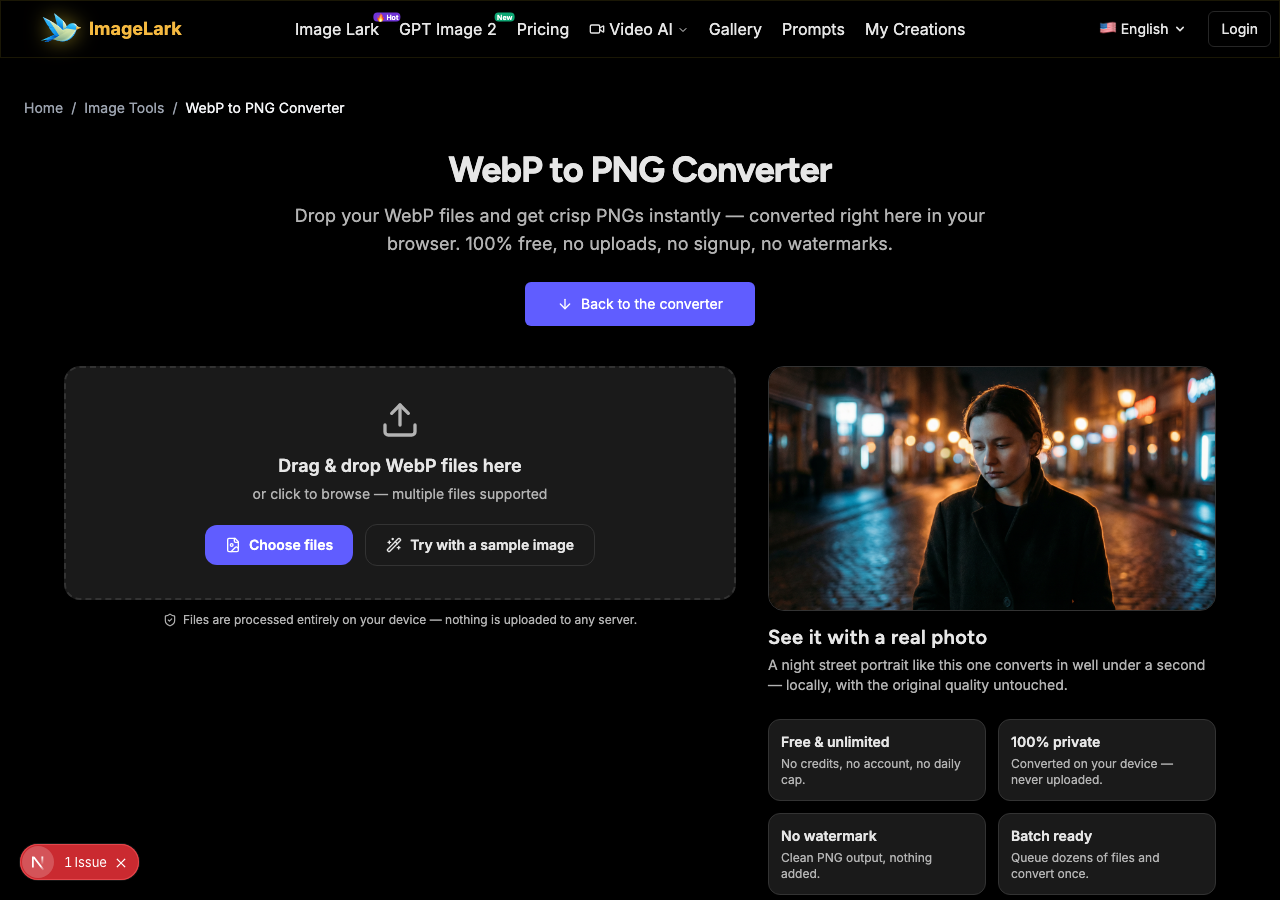
STEP 1
Add your WebP files
Drag and drop one or more .webp files onto the tool above, or click the upload area to browse your device. No account needed. You can also press “Try with a sample image” to watch the converter work without any file of your own.
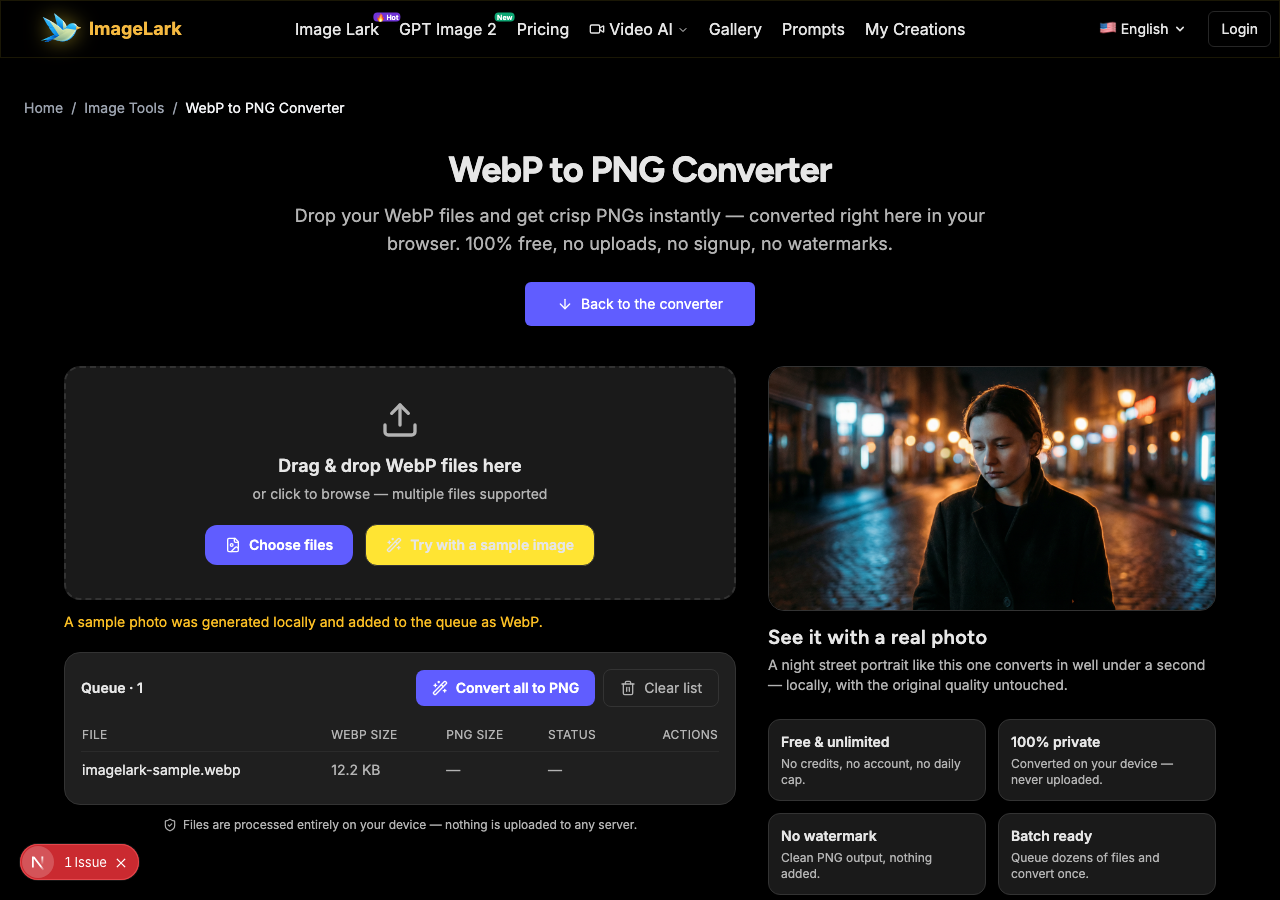
STEP 2
Convert to PNG
Press “Convert all to PNG”. Each image is decoded and re-encoded to PNG locally in your browser via the Canvas API — nothing is uploaded, so there is no wait, no queue and no file size limit. The queue shows each file flip from WebP size to PNG size as it finishes.
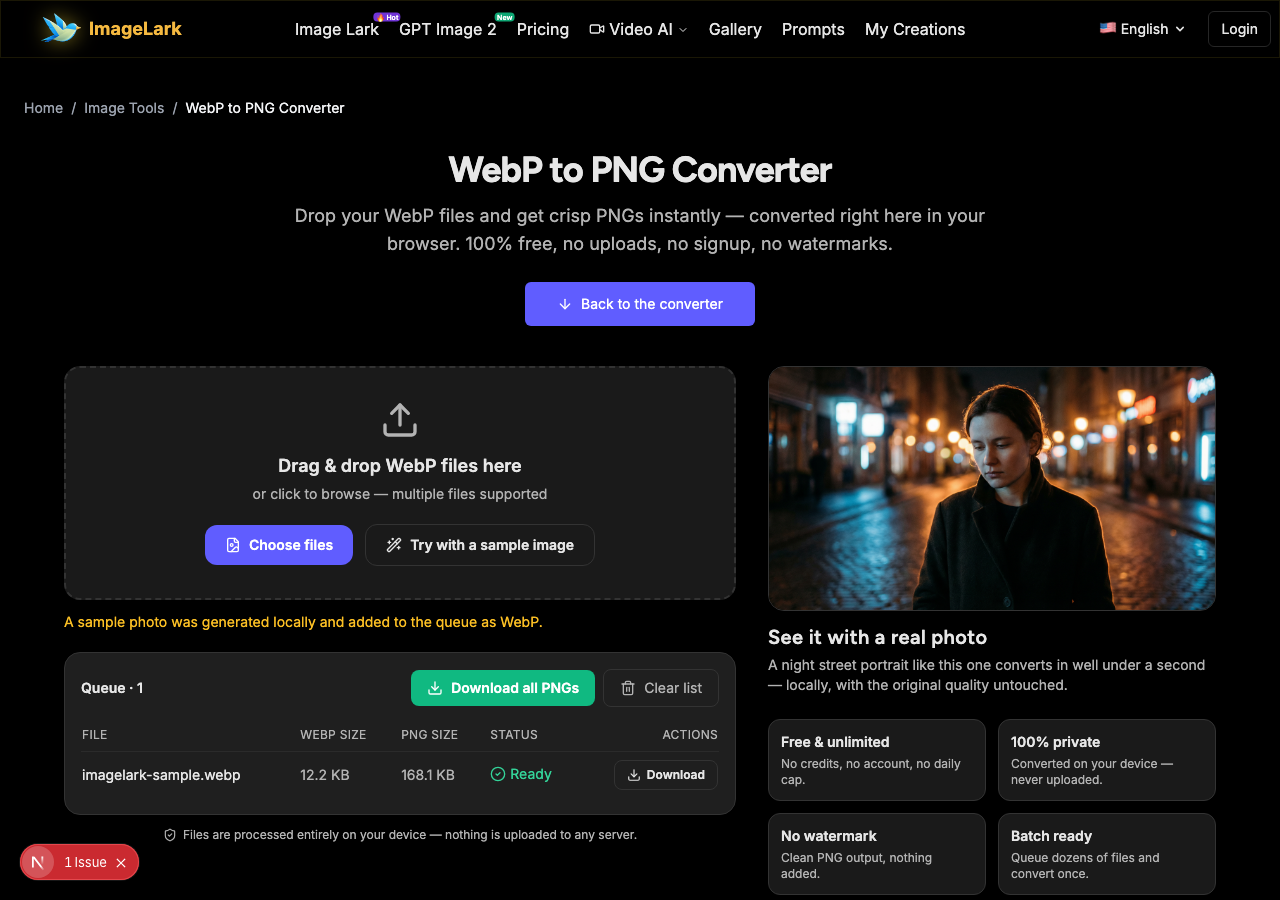
STEP 3
Download your PNGs
Save each PNG individually with its Download button, or grab the whole batch at once with “Download all PNGs”. Transparency is preserved and the encoding is lossless, so the PNG you downloaded is exactly the image you saw.
Why Use ImageLark to Convert WebP to PNG
100% free, no limits
Convert a single screenshot or a folder of five hundred assets — there are no credits to buy, no account to create and no “3 conversions per day” ceiling. The converter is a browser tool, not a trial.
Your photos never leave your device
Most online converters upload every file to their servers. This one runs the conversion inside your browser tab with the Canvas API, so your images are not transmitted, stored or logged anywhere. Client-side processing also makes it fast: there is no round-trip to a data center, which is why even large photos finish in under a second.
Lossless quality with transparency preserved
PNG is a lossless format, so nothing is thrown away when the file is written. If your WebP has a transparent background, the PNG keeps the alpha channel pixel-for-pixel — no surprise white boxes, no halo edges.
Batch conversion built in
Drop an entire queue of WebP files, press one button and download the finished PNGs together. Every file is listed with its before-and-after size, so you always know what you are saving.
WebP vs PNG: When You Should Not Convert
Both formats are image formats, but they are optimized for different jobs. WebP is a modern delivery format: at the same visual quality it stores photos 25–34% smaller than a comparable JPEG, and far smaller than PNG, which is why websites love it. PNG is the universal workhorse: lossless, alpha-channel transparency, and support in every piece of software released in the last three decades.
| WebP | PNG | |
|---|---|---|
| Compression | Lossy or lossless | Lossless only |
| Transparency (alpha) | Yes | Yes |
| Photo file size | Much smaller | Larger |
| Compatibility | All modern browsers | Universal since 1996 |
| Best for | Fast websites, saving storage | Editing, screenshots, legacy apps, strict upload forms |
Keep the WebP when the image is heading to the web and every kilobyte counts — converting it to PNG will only make the file several times larger with zero visible gain. Convert WebP to PNG when: an editor or design tool wants PNG layers, the destination form or marketplace rejects .webp uploads, the file is a screenshot full of text that needs to stay razor sharp through future edits, or the recipient's older software simply cannot open WebP.
One honest expectation: converting does not improve an image. A lossy WebP stays exactly as sharp as it was — no more, no less. If the real problem is that the picture is too small for where it needs to go, convert it first, then let the AI image upscaler enlarge it, or run the photo enhancer to clean up detail. And if you need to go the other way — shrinking PNG photos for email or the web — a dedicated PNG to JPG converter will handle that job once it lands here.
Working with images beyond format conversion? The online image editor, the AI image upscaler and the AI photo enhancer cover the rest of the workflow.
Use Cases: Who Converts WebP to PNG
Photographers & designers
Client hand-offs, portfolio PDFs and layered mockups usually demand PNG. Convert the WebP exports your camera app or pipeline produced, keep transparency intact, and deliver files that open cleanly in any editor.
Web developers
Modern sites ship WebP, but plenty of downstream tooling — legacy CMS plugins, issue trackers, design hand-off platforms, QA checklists — still asks for PNG. Batch-convert downloaded WebP assets before they enter an older pipeline.
Online sellers & form submissions
Marketplaces, government portals, schools and contest forms frequently reject .webp uploads. A quick local conversion to PNG gets the upload accepted without installing anything — and because nothing is uploaded here, sensitive documents stay on your machine.
Frequently Asked Questions
Does converting WebP to PNG lose quality?
No. PNG is a lossless format, so the pixels that come out are the pixels that went in. If the source WebP was saved with lossy compression, the conversion cannot restore detail that was already discarded when the WebP was created — but it does not remove anything further. What you had is exactly what you get.
Why is my PNG larger than the original WebP?
WebP uses modern compression that stores photographic images far more efficiently — often 25–34% smaller than an equivalent JPEG and many times smaller than PNG. When you convert to lossless PNG, every pixel is stored explicitly, so photo-like images grow substantially. That is the trade-off for maximum compatibility and edit-friendliness.
How do I convert WebP to PNG on Mac or Windows?
You just did it the same way on both: open this page in any modern browser — Chrome, Edge, Firefox or Safari — drop your .webp file into the tool and download the PNG. There is nothing to install on either system, and the steps are identical on Linux, ChromeOS, Android and iOS.
Can I convert multiple WebP files at once?
Yes. Drag a whole selection (or an entire folder's worth) into the drop zone and every file joins the queue. Press “Convert all to PNG” once and each row shows its finished PNG with its size; “Download all PNGs” saves the entire batch in one go.
Is the WebP to PNG converter free to use?
Completely. There is no signup, no credit card, no watermark on the output and no conversion limit. ImageLark's image tools are browser-based utilities — you simply open the page and use them.
Do you store the images I convert?
No. The conversion happens in your browser with JavaScript and the Canvas API. Your files are never uploaded to ImageLark or anywhere else, and closing the tab erases them. This makes the tool safe for screenshots, personal photos and confidential documents.
أدوات الصور بالذكاء الاصطناعي ذات الصلة
Ready to Convert Your WebP Files?
Drop them above and download lossless PNGs in seconds — free, private and watermark-free.